Follow-ups die in your inbox.
The meeting went well. The recap and the next step never went out.

Business development / Strategy
Research / Marketing
Press Send installs a draft-only AI staff in your own cloud. It researches markets and accounts, preps your meetings, remembers every promise and drafts the follow-up, the brief and the campaign. Then it stops one click short, on purpose. The judgment stays yours.
Click through the demo now, or book 30 minutes with us on a demo company. No real customer data. See how it works
Thanks for the time on Tuesday. You asked for a short plan before your board meets, so here it is, with owners and dates for each step.
01 / The problem
In an owner-led firm you are the business developer, the strategist, the researcher and the marketer. Every opportunity runs through your inbox, your calendar and your memory.
The meeting went well. The recap and the next step never went out.
Markets, competitors and target accounts deserve a proper look. The free afternoon never comes.
Promises, decisions and who said what are spread across mail, calendar and memory.
The post, the newsletter and the case for your next market stay half-written. The quiet week never comes either.
Growth isn't short on information. It's short on attention.
More output is not the fix. Autopilot AI tools churn out volume, flood inboxes and put your name on work you never read. Press Send goes the other way: fewer, better pieces of work, each one approved by the person whose name is on it.
02 / What it is
A team of single-job AI bots with one front door, shared memory and hard guardrails. They research, remember and draft across business development, strategy and marketing. You decide and press Send.
The staff
The second brain
The relationship graph
03 / A day with Press Send
One queue of what needs you today: decide, send or approve. Noise stays out.
Who is in the room, the history, open promises and any warm path in.
Recap, decisions and a follow-up in your voice, saved as a draft.
A sourced brief on a market or competitor, plus outreach and posts drafted in your voice.
Every opportunity and initiative gets a call: Advance, Nurture or Kill, with the evidence quoted.
Then you read it, edit it and press Send. Nothing goes out on its own.
Fair warning:
you'll be
waiting
on
everyone else.
04 / See it in action
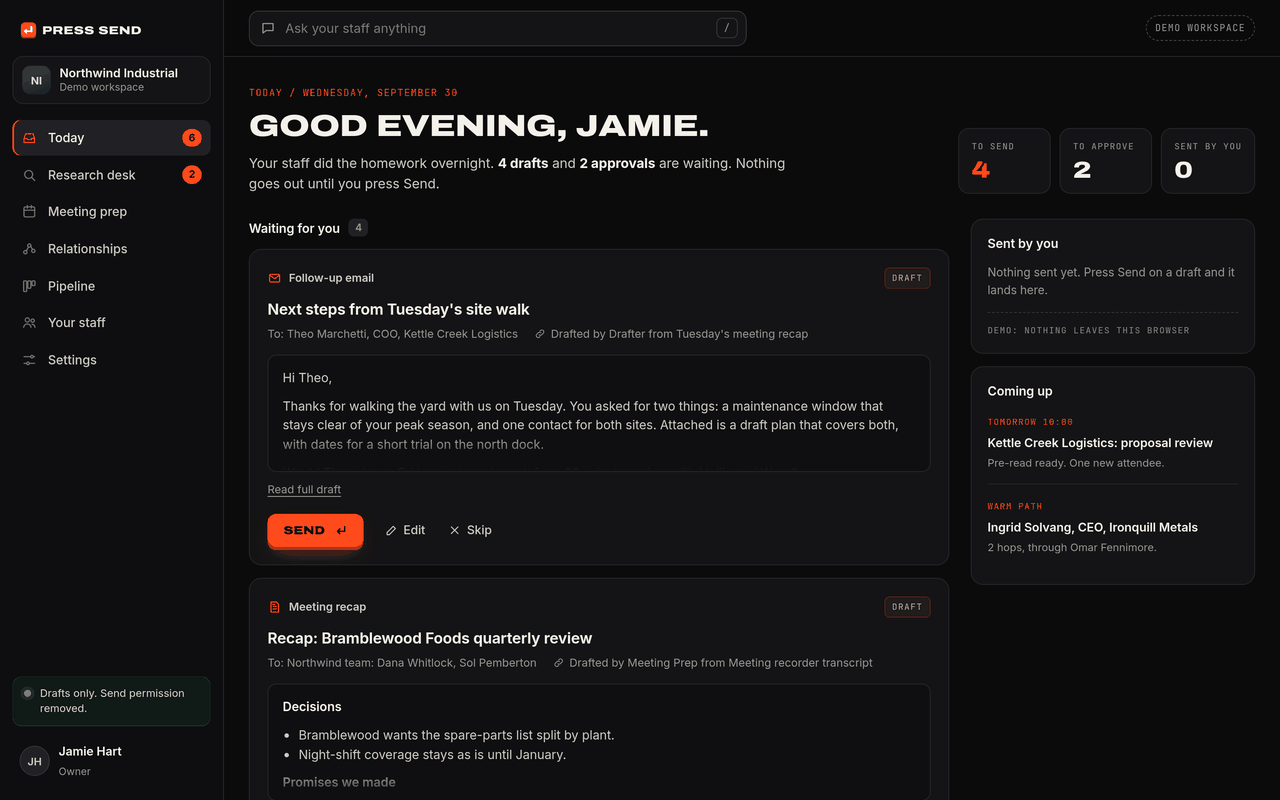
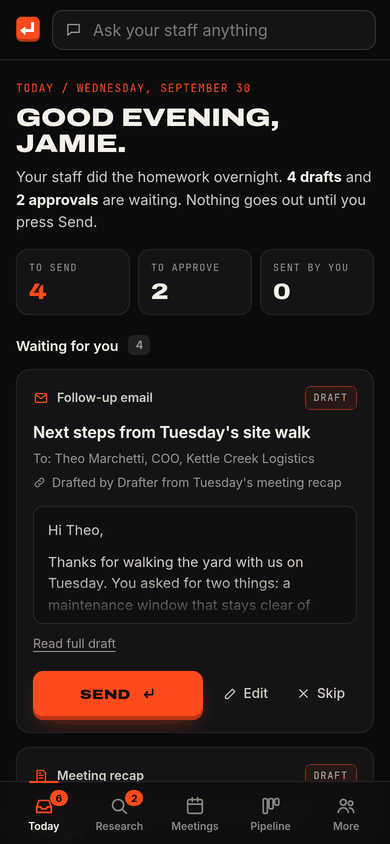
The owner app runs in your browser, no sign-up. It opens on Today: drafts and approvals your staff prepared overnight, each one waiting for you.
Things to try
Press Send on a draft. Read the follow-up, edit it, press Send. It moves to Sent by you.
Open the warm-path graph. Relationships shows who knows whom and the 2-hop path into a target account.
Ask your staff. Type a question in the top bar, or pick a suggestion, and your chief of staff answers.
Installs on your phone. Open the demo on your phone and add it to your home screen. It opens like an app.
A demo workspace for a fictional company. Every person, account and source in it is made up. Nothing you do there sends, posts or saves anywhere.
05 / How it works
Mail and calendar metadata, your CRM, your meeting recaps and the research sources you choose. Read and draft access only.
A second brain and a relationship graph. Every fact points back to where it came from.
Follow-ups, research briefs, strategy notes and marketing copy, saved as drafts. Nothing goes out.
A named person approves every send and every change to your records. Each one is logged.
06 / Trust and control
The guardrails are built into the install, not left to a settings page. If you want to know exactly what it can touch, we will show you line by line.
mail.drafts.createallowedmail.sendremovedcrm.stage.updateneeds approvalcrm.notes.writeloggedThe mail connection can create drafts. It cannot send. The send tool is removed, not just switched off.
Changes to your records, from CRM stages to owners and forecasts, become approval cards for a named person.
If a system is signed out or sources conflict, it stops and says so. It never invents facts.
The stack, database and logs live in your account. Leaving means we remove our access. Nothing to return.
Read and draft access only. Keys stay in your own secret store, never in a playbook.
Every draft, approval and record change is logged with who, what and when.
07 / What you get
We install it, tune it to how you work and train your admin. You own the account it runs in.
Included
Connects to
Add later
08 / Onboarding
Access, two 90-minute interviews on your accounts, voice and rules, and your baseline.
Exit test: access granted, baseline set
Deploy in your cloud. Connect mail, calendar and CRM with read access.
Exit test: today's brief, zero sends
Seed the second brain from 90 days of history and build your graph.
Exit test: 5 history questions, all sourced
Chief of staff, meeting prep and after-action switched on.
Exit test: first follow-up sent by you
What we need from you: an owner (about 2 hours a week), an admin (about 1 hour a week), a sponsor, your Azure or AWS account, Microsoft 365 or Google, your CRM and a meeting recorder.
09 / Who it's for
A good fit
Not a fit
10 / Founding cohort
Press Send is new, so you won't find borrowed logos or made-up numbers here. We are installing with a small group of founding customers. We set your baseline in week one and measure against it with you.
What we measure together
These are goals, not promises.
As a founding customer
Press Send started as one founder's own staff, built because he was the bottleneck. He still runs his business development on it every day.
Ask about a founding spot11 / FAQ
Anything else, ask us on the walkthrough.
Yes. Open the demo in your browser. It runs on a fictional company, so you can press Send, approve changes and ask your staff questions without touching real data. It also installs on your phone home screen.
No. The mail connection can create drafts and cannot send. The send tool is removed from the install, not just switched off. A person on your team reads, edits and presses Send.
It is broader than that. Press Send does the homework behind growing a firm: business development, strategy, research and marketing. Unlike autopilot AI tools, it never sends volume on your behalf. Every send and every change to your records waits for a named person.
Meeting prep and follow-ups, research briefs on markets, competitors and accounts, strategy notes for your next decision, and outreach and marketing drafts in your voice. All of it lands as a draft with its sources attached.
In your own Azure or AWS account. The stack, database and logs run there. If you leave, we remove our access and there is nothing to hand back.
Microsoft 365 or Google for mail and calendar, HubSpot, Salesforce or Zoho for CRM, your meeting recorder, and Azure OpenAI, AWS Bedrock or your own model key.
The onboarding plan is 30 days, with an exit test at the end of each week. Outreach and marketing drafts, CRM sync with approvals and the opportunity review follow in days 31 to 60.
There is a one-time implementation and a monthly fee. Cloud and AI model usage bill to your own account. We share founding-customer pricing on the walkthrough.
An owner for about 2 hours a week, an admin for about 1 hour a week and an executive sponsor, plus access to your cloud account, mail, CRM and meeting recorder.
It stops and says so. If a system is signed out or two sources disagree, you get a flag, not a guess.
Next step
Walkthrough. 30 minutes on a demo company. No real customer data.
Fit check. Your team, your stack, your bottleneck.
Book your slot. Sign, and we schedule your install.